Save LeetCode to Notion Instantly
A Chrome extension that automatically captures your LeetCode problems, solutions, and notes — syncing everything to your Notion database with one click.
See It In Action
A seamless workflow from LeetCode to your organized Notion database.
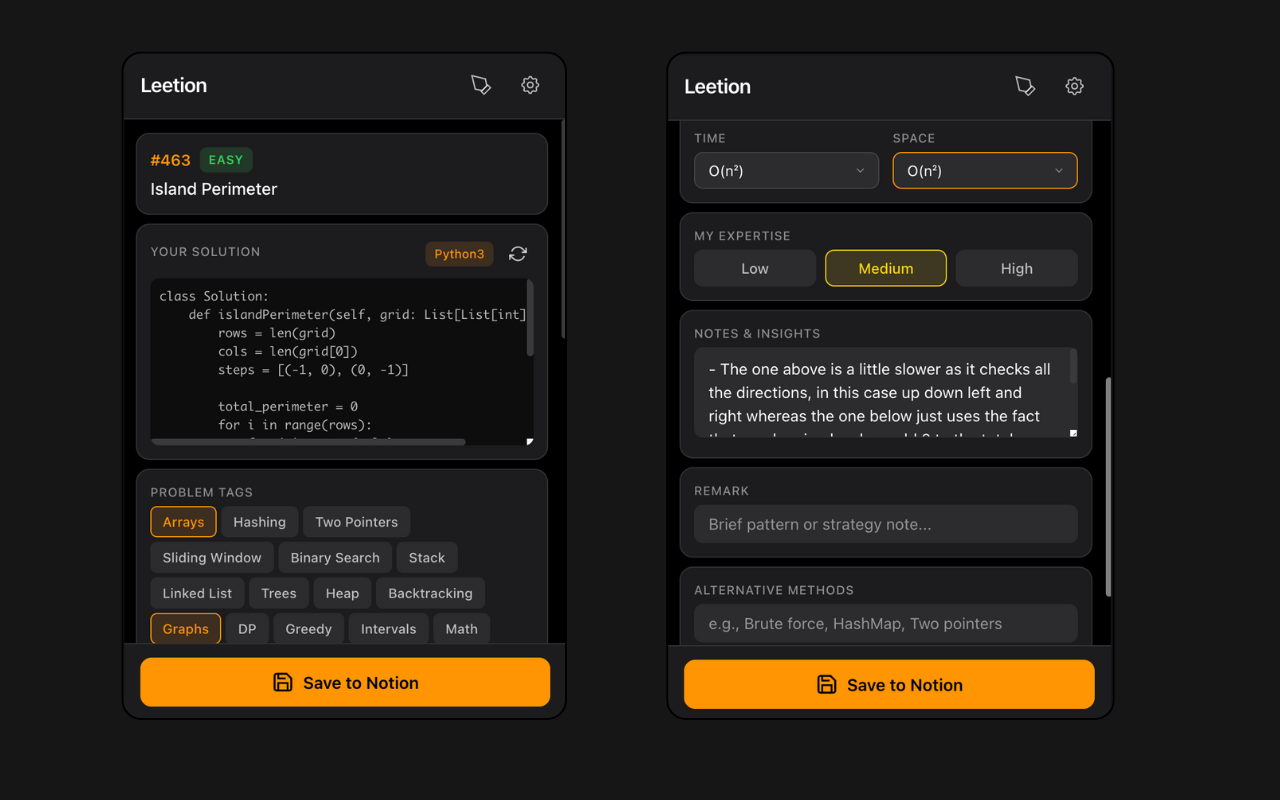
Smart Capture
Instantly capture problem details, your solution, and add custom tags with complexity analysis
Everything You Need
Powerful features designed to make tracking your LeetCode progress effortless.
Auto-Capture
Automatically extracts problem title, number, difficulty, code, and language from LeetCode. No copy-pasting needed.
Smart Tags
Detects problem tags from LeetCode and lets you add custom tags, expertise levels, and alternative methods.
Spaced Repetition
Automatically sets review dates based on your preferences. Never forget to revisit problems again.
Multi-Language
Saves solutions in different languages separately. Switch from Python to Java? Both solutions are preserved.
Drawing Canvas
Sketch diagrams and visual notes directly on the page. Save drawings to your downloads folder.
Rich Notes
Write notes with markdown formatting — headings, bullet points, bold, italic. Everything syncs beautifully to Notion.
Get Started in Minutes
Setting up Leetion is quick and easy. Follow these simple steps.
Install the Extension
Download the extension from the chrome web store.
Create a Notion Integration
Go to notion.so/my-integrations and create a new integration. Copy the Internal Integration Secret.
Connect to Your Database
Duplicate our Notion template and share it with your integration. Paste your Database ID and API key in the extension.
Start Saving Solutions
Navigate to any LeetCode problem and click the extension. Your solution will be automatically saved to Notion!